mirror of
https://github.com/upstash/context7.git
synced 2025-12-01 09:31:58 +00:00

318 lines
9.2 KiB
Markdown
318 lines
9.2 KiB
Markdown
# Context7 MCP - 为所有Prompt获取最新文档
|
||
|
||
[](https://context7.com) [](https://smithery.ai/server/@upstash/context7-mcp) [<img alt="在VS Code中安装 (npx)" src="https://img.shields.io/badge/VS_Code-VS_Code?style=flat-square&label=安装Context7%20MCP&color=0098FF">](https://insiders.vscode.dev/redirect?url=vscode%3Amcp%2Finstall%3F%257B%2522name%2522%253A%2522context7%2522%252C%2522config%2522%253A%257B%2522command%2522%253A%2522npx%2522%252C%2522args%2522%253A%255B%2522-y%2522%252C%2522%2540upstash%252Fcontext7-mcp%2540latest%2522%255D%257D%257D)
|
||
|
||
## ❌ 不使用Context7
|
||
|
||
大语言模型(LLM)可能依赖过时或通用的库信息。你可能会遇到:
|
||
|
||
- ❌ 代码示例已过时,或基于一年前的训练数据
|
||
- ❌ 幻觉产生的API根本不存在
|
||
- ❌ 针对旧版本包的通用回答
|
||
|
||
## ✅ 使用Context7
|
||
|
||
Context7 MCP直接从源头获取最新的、特定版本的文档和代码示例 — 并将它们直接放入你的提示中。
|
||
|
||
在Cursor中添加`使用 context7`到你的提示:
|
||
|
||
```txt
|
||
创建一个使用app router的基本Next.js项目。使用 context7
|
||
```
|
||
|
||
```txt
|
||
创建一个脚本,删除PostgreSQL数据库中city字段为""的行。使用 context7
|
||
```
|
||
|
||
Context7将最新的代码示例和文档直接获取到你的LLM上下文中。
|
||
|
||
- 1️⃣ 按照往常,自然地编写你的提示
|
||
- 2️⃣ 告诉LLM`使用 context7`
|
||
- 3️⃣ 获取可用的代码回复
|
||
|
||
无需在标签间切换,不存在幻觉API,不会生成过时的代码。
|
||
|
||
## 🛠️ 开始使用
|
||
|
||
### 要求
|
||
|
||
- Node.js >= v18.0.0
|
||
- Cursor, Windsurf, Claude Desktop或其他MCP客户端
|
||
|
||
### 通过Smithery安装
|
||
|
||
要通过[Smithery](https://smithery.ai/server/@upstash/context7-mcp)自动安装Context7 MCP Server for Claude Desktop:
|
||
|
||
```bash
|
||
npx -y @smithery/cli install @upstash/context7-mcp --client claude
|
||
```
|
||
|
||
### 在Cursor中安装
|
||
|
||
前往:`Settings` -> `Cursor Settings` -> `MCP` -> `Add new global MCP server`
|
||
|
||
推荐的方法是将以下配置粘贴到你的Cursor `~/.cursor/mcp.json`文件中。更多信息请参见[Cursor MCP文档](https://docs.cursor.com/context/model-context-protocol)。
|
||
|
||
```json
|
||
{
|
||
"mcpServers": {
|
||
"context7": {
|
||
"command": "npx",
|
||
"args": ["-y", "@upstash/context7-mcp@latest"]
|
||
}
|
||
}
|
||
}
|
||
```
|
||
|
||
<details>
|
||
<summary>替代方案:使用Bun</summary>
|
||
|
||
```json
|
||
{
|
||
"mcpServers": {
|
||
"context7": {
|
||
"command": "bunx",
|
||
"args": ["-y", "@upstash/context7-mcp@latest"]
|
||
}
|
||
}
|
||
}
|
||
```
|
||
|
||
</details>
|
||
|
||
<details>
|
||
<summary>替代方案:使用Deno</summary>
|
||
|
||
```json
|
||
{
|
||
"mcpServers": {
|
||
"context7": {
|
||
"command": "deno",
|
||
"args": ["run", "--allow-net", "npm:@upstash/context7-mcp"]
|
||
}
|
||
}
|
||
}
|
||
```
|
||
|
||
</details>
|
||
|
||
### 在Windsurf中安装
|
||
|
||
将此内容添加到你的Windsurf MCP配置文件中。更多信息请参见[Windsurf MCP文档](https://docs.windsurf.com/windsurf/mcp)。
|
||
|
||
```json
|
||
{
|
||
"mcpServers": {
|
||
"context7": {
|
||
"command": "npx",
|
||
"args": ["-y", "@upstash/context7-mcp@latest"]
|
||
}
|
||
}
|
||
}
|
||
```
|
||
|
||
### 在VSCode中安装
|
||
|
||
[<img alt="在VS Code中安装 (npx)" src="https://img.shields.io/badge/VS_Code-VS_Code?style=flat-square&label=安装Context7%20MCP&color=0098FF">](https://insiders.vscode.dev/redirect?url=vscode%3Amcp%2Finstall%3F%257B%2522name%2522%253A%2522context7%2522%252C%2522config%2522%253A%257B%2522command%2522%253A%2522npx%2522%252C%2522args%2522%253A%255B%2522-y%2522%252C%2522%2540upstash%252Fcontext7-mcp%2540latest%2522%255D%257D%257D)
|
||
[<img alt="在VS Code Insiders中安装 (npx)" src="https://img.shields.io/badge/VS_Code_Insiders-VS_Code_Insiders?style=flat-square&label=安装Context7%20MCP&color=24bfa5">](https://insiders.vscode.dev/redirect?url=vscode-insiders%3Amcp%2Finstall%3F%257B%2522name%2522%253A%2522context7%2522%252C%2522config%2522%253A%257B%2522command%2522%253A%2522npx%2522%252C%2522args%2522%253A%255B%2522-y%2522%252C%2522%2540upstash%252Fcontext7-mcp%2540latest%2522%255D%257D%257D)
|
||
|
||
将此内容添加到你的VSCode MCP配置文件中。更多信息请参见[VSCode MCP文档](https://code.visualstudio.com/docs/copilot/chat/mcp-servers)。
|
||
|
||
```json
|
||
{
|
||
"servers": {
|
||
"Context7": {
|
||
"type": "stdio",
|
||
"command": "npx",
|
||
"args": ["-y", "@upstash/context7-mcp@latest"]
|
||
}
|
||
}
|
||
}
|
||
```
|
||
|
||
### 在Zed中安装
|
||
|
||
可以通过[Zed扩展](https://zed.dev/extensions?query=Context7)安装,或者你可以将以下内容添加到你的Zed `settings.json`文件中。更多信息请参见[Zed Context Server文档](https://zed.dev/docs/assistant/context-servers)。
|
||
|
||
```json
|
||
{
|
||
"context_servers": {
|
||
"Context7": {
|
||
"command": {
|
||
"path": "npx",
|
||
"args": ["-y", "@upstash/context7-mcp@latest"]
|
||
},
|
||
"settings": {}
|
||
}
|
||
}
|
||
}
|
||
```
|
||
|
||
### 在Claude Code中安装
|
||
|
||
运行此命令。更多信息请参见[Claude Code MCP文档](https://docs.anthropic.com/en/docs/agents-and-tools/claude-code/tutorials#set-up-model-context-protocol-mcp)。
|
||
|
||
```sh
|
||
claude mcp add context7 -- npx -y @upstash/context7-mcp@latest
|
||
```
|
||
|
||
### 在Claude Desktop中安装
|
||
|
||
将此内容添加到你的Claude Desktop `claude_desktop_config.json`文件中。更多信息请参见[Claude Desktop MCP文档](https://modelcontextprotocol.io/quickstart/user)。
|
||
|
||
```json
|
||
{
|
||
"mcpServers": {
|
||
"Context7": {
|
||
"command": "npx",
|
||
"args": ["-y", "@upstash/context7-mcp@latest"]
|
||
}
|
||
}
|
||
}
|
||
```
|
||
|
||
### 使用Docker(容器部署)
|
||
|
||
如果你希望使用Docker容器运行MCP服务器:
|
||
|
||
1. **构建Docker镜像:**
|
||
|
||
**确保Docker Desktop(或Docker守护进程)正在运行。** 在项目根目录运行:
|
||
|
||
```bash
|
||
docker build -t context7-mcp .
|
||
```
|
||
|
||
2. **配置MCP客户端:**
|
||
|
||
更新MCP客户端配置以使用Docker命令。
|
||
|
||
_cline_mcp_settings.json配置示例:_
|
||
|
||
```json
|
||
{
|
||
"mcpServers": {
|
||
"Сontext7": {
|
||
"autoApprove": [],
|
||
"disabled": false,
|
||
"timeout": 60,
|
||
"command": "docker",
|
||
"args": ["run", "-i", "--rm", "context7-mcp"],
|
||
"transportType": "stdio"
|
||
}
|
||
}
|
||
}
|
||
```
|
||
|
||
_注意事项:_
|
||
<em>
|
||
|
||
- 此为示例配置。请参考前面README中针对具体MCP客户端(如Cursor、VS Code等)的示例来调整结构(如`mcpServers`与`servers`)。同时确保`args`中的镜像名称与`docker build`命令使用的标签一致。
|
||
- 当前Cursor版本(0.49.5), 请不要使用本方式启动MCP server,详情:[Cursor官方说明](https://docs.cursor.com/context/model-context-protocol#remote-development)
|
||
</em>
|
||
|
||
### 在Windows上安装
|
||
|
||
在windows上的配置相对于linux或macos来说有些许不同,(_示例使用的`Cline`_), 其它编辑器同理, 参考`command`和`args`的配置即可
|
||
|
||
```json
|
||
{
|
||
"mcpServers": {
|
||
"github.com/upstash/context7-mcp": {
|
||
"command": "cmd",
|
||
"args": ["/c", "npx", "-y", "@upstash/context7-mcp@latest"],
|
||
"disabled": false,
|
||
"autoApprove": []
|
||
}
|
||
}
|
||
}
|
||
```
|
||
|
||
### 可用工具
|
||
|
||
- `resolve-library-id`: 将通用库名称解析为Context7兼容的库ID。
|
||
- `libraryName` (必需)
|
||
- `get-library-docs`: 使用Context7兼容的库ID获取库的文档。
|
||
- `context7CompatibleLibraryID` (必需)
|
||
- `topic` (可选): 将文档集中在特定主题上(例如"routing"、"hooks")
|
||
- `tokens` (可选,默认10000): 返回的最大令牌数。小于10000的值会自动增加到10000。
|
||
|
||
## 开发
|
||
|
||
克隆项目并安装依赖:
|
||
|
||
```bash
|
||
bun i
|
||
```
|
||
|
||
构建:
|
||
|
||
```bash
|
||
bun run build
|
||
```
|
||
|
||
### 本地配置示例
|
||
|
||
```json
|
||
{
|
||
"mcpServers": {
|
||
"context7": {
|
||
"command": "npx",
|
||
"args": ["tsx", "/path/to/folder/context7-mcp/src/index.ts"]
|
||
}
|
||
}
|
||
}
|
||
```
|
||
|
||
### 使用MCP Inspector测试
|
||
|
||
```bash
|
||
npx -y @modelcontextprotocol/inspector npx @upstash/context7-mcp@latest
|
||
```
|
||
|
||
## 故障排除
|
||
|
||
### ERR_MODULE_NOT_FOUND
|
||
|
||
如果你看到这个错误,请尝试使用`bunx`而不是`npx`。
|
||
|
||
```json
|
||
{
|
||
"mcpServers": {
|
||
"context7": {
|
||
"command": "bunx",
|
||
"args": ["-y", "@upstash/context7-mcp@latest"]
|
||
}
|
||
}
|
||
}
|
||
```
|
||
|
||
这通常可以解决模块解析问题,特别是在`npx`无法正确安装或解析包的环境中。
|
||
|
||
### MCP客户端错误
|
||
|
||
1. 尝试从包名中删除`@latest`。
|
||
|
||
2. 尝试使用`bunx`作为替代方案。
|
||
|
||
3. 尝试使用`deno`作为替代方案。
|
||
|
||
4. 确保你使用的是Node v18或更高版本,以便使用`npx`时获得原生fetch支持。
|
||
|
||
## Context7媒体报道
|
||
|
||
- [Better Stack: "免费工具让Cursor变得更智能10倍"](https://youtu.be/52FC3qObp9E)
|
||
- [Cole Medin: "这绝对是AI编码助手的最佳MCP服务器"](https://www.youtube.com/watch?v=G7gK8H6u7Rs)
|
||
- [Income stream surfers: "Context7 + SequentialThinking MCPs: 这是AGI吗?"](https://www.youtube.com/watch?v=-ggvzyLpK6o)
|
||
- [Julian Goldie SEO: "Context7: 新的MCP AI代理更新"](https://www.youtube.com/watch?v=CTZm6fBYisc)
|
||
- [JeredBlu: "Context 7 MCP: 即时获取文档 + VS Code设置"](https://www.youtube.com/watch?v=-ls0D-rtET4)
|
||
- [Income stream surfers: "Context7: 将改变AI编码的新MCP服务器"](https://www.youtube.com/watch?v=PS-2Azb-C3M)
|
||
|
||
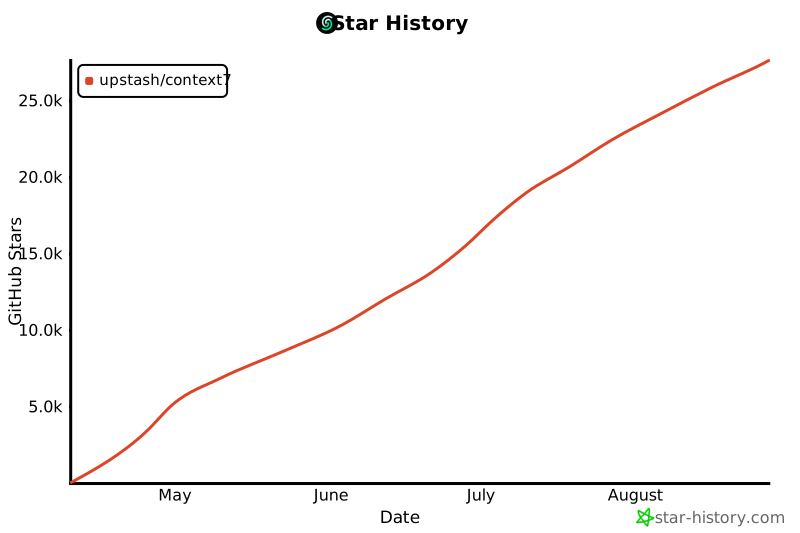
## Star历史
|
||
|
||
[](https://www.star-history.com/#upstash/context7&Date)
|
||
|
||
## 许可证
|
||
|
||
MIT
|